
Auto-Post ke Website dengan OpenClaw — Content Publishing Otomatis
📎 Source:openclaw-sumopod — view on GitHub & star ⭐
Auto-Post to Website from Images
Transform photos into polished website posts automatically using OpenClaw.
Overview
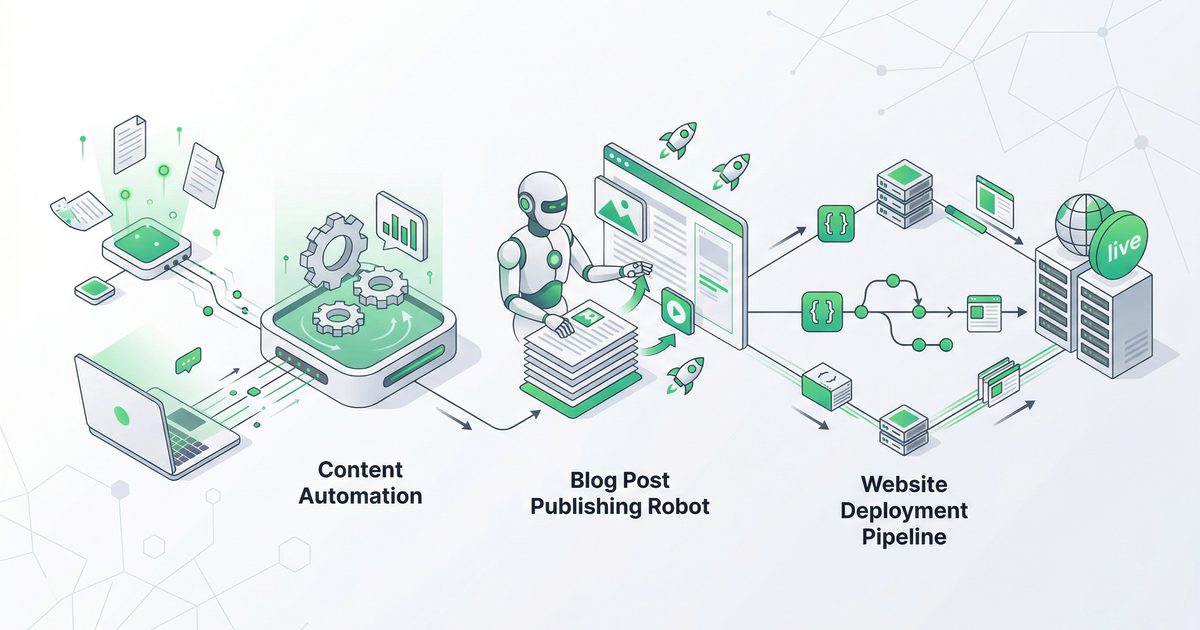
This tutorial shows how to build an automated content pipeline that:
- Takes an image input (product photo, project update, etc.)
- Generates bilingual content (Indonesian + English) using AI
- Posts directly to your website via API
Perfect for: Company updates, product showcases, project documentation, portfolio entries.
What You'll Learn
- Image-to-content generation workflow
- Bilingual content creation (ID/EN)
- API integration for automated posting
- Multi-company/tenant support
Prerequisites
- OpenClaw installed
- Website with API endpoint (POST /api/posts)
- API authentication (JWT/bearer token)
- Image source (uploaded file or URL)
Architecture
[User sends photo]
        ↓
[OpenClaw receives image]
        ↓
[AI generates content]
  - Title (ID & EN)
  - Description (ID & EN)
  - Caption (ID & EN)
  - Tags/categories
        ↓
[POST to website API]
        ↓
[Website publishes post]
        ↓
[Confirmation sent to user]
Step 1: Prepare Your Website API
Required API Endpoint
POST /api/posts
Content-Type: application/json
Authorization: Bearer YOUR_TOKEN
Request Body Structure
{
  "companyId": 1,
  "titleId": "Judul Bahasa Indonesia",
  "titleEn": "English Title",
  "contentId": "Konten dalam Bahasa Indonesia...",
  "contentEn": "Content in English...",
  "captionId": "Caption Indonesia",
  "captionEn": "English caption",
  "tags": ["tag1", "tag2"],
  "media": ["base64encodedimage..."]
}
Company IDs (Example)
Step 2: Create the Automation Script
Create scripts/auto-post-website.py:
#!/usr/bin/env python3
"""
Auto-post to website from image
Usage: python3 auto-post-website.py <image_path> <company_id> <brief_description>
"""

import sys
import base64
import requests
import json

# Configuration
API_URL = "https://your-website.com/api/posts"
API_TOKEN = "your-bearer-token-here"

def encode_image(image_path):
    """Convert image to base64"""
    with open(image_path, "rb") as f:
        return base64.b64encode(f.read()).decode("utf-8")

def generate_content(image_path, description, company_name):
    """Generate bilingual content using AI"""

    # Read image as base64 for context (optional - depends on your AI setup)
    image_base64 = encode_image(image_path)

    prompt = f"""Generate a bilingual website post about this image.

Context: {description}
Company: {company_name}

Generate in this JSON format:
{{
  "titleId": "Judul menarik dalam Bahasa Indonesia",
  "titleEn": "Compelling English title",
  "contentId": "Konten detail dalam Bahasa Indonesia (2-3 paragraf)",
  "contentEn": "Detailed content in English (2-3 paragraphs)",
  "captionId": "Caption singkat Indonesia",
  "captionEn": "Short English caption",
  "tags": ["tag1", "tag2", "tag3"]
}}

Guidelines:
- Professional tone suitable for company website
- Highlight key features or achievements
- Include relevant technical details if applicable
- SEO-friendly titles"""

    # Call your AI model (OpenClaw, OpenAI, etc.)
    # This is a placeholder - replace with actual AI call
    response = call_ai_model(prompt, image_base64)
    return json.loads(response)

def post_to_website(data, image_base64):
    """Post content to website API"""

    payload = {
        **data,
        "media": [image_base64]
    }

    headers = {
        "Content-Type": "application/json",
        "Authorization": f"Bearer {API_TOKEN}"
    }

    response = requests.post(API_URL, json=payload, headers=headers)
    return response.json()

def main():
    if len(sys.argv) < 4:
        print("Usage: python3 auto-post-website.py <image_path> <company_id> <description>")
        sys.exit(1)

    image_path = sys.argv[1]
    company_id = int(sys.argv[2])
    description = sys.argv[3]

    # Company mapping
    companies = {
        1: "Company A",
        2: "Company B",
        3: "Company C",
        4: "Company D"
    }
    company_name = companies.get(company_id, "Unknown")

    print(f"📝 Processing image for {company_name}...")

    # Generate content
    content = generate_content(image_path, description, company_name)
    content["companyId"] = company_id

    print("✅ Content generated:")
    print(f"   ID Title: {content['titleId']}")
    print(f"   EN Title: {content['titleEn']}")

    # Encode image
    image_base64 = encode_image(image_path)

    # Post to website
    print("🚀 Posting to website...")
    result = post_to_website(content, image_base64)

    if result.get("success"):
        print(f"✅ Posted successfully!")
        print(f"   Post ID: {result.get('id')}")
        print(f"   URL: {result.get('url')}")
    else:
        print(f"❌ Failed: {result.get('error')}")
        sys.exit(1)

if __name__ == "__main__":
    main()
Step 3: Test the Script
# Make executable
chmod +x scripts/auto-post-website.py

# Test with sample image
python3 scripts/auto-post-website.py \
  /path/to/image.jpg \
  2 \
  "New equipment arrival for upcoming project"
Expected Output:
📝 Processing image for Company B...
✅ Content generated:
   ID Title: Penerimaan Peralatan Baru untuk Proyek Mendatang
   EN Title: New Equipment Arrival for Upcoming Project
🚀 Posting to website...
✅ Posted successfully!
   Post ID: 47
   URL: https://your-website.com/posts/47
Step 4: Integrate with OpenClaw
Create skills/auto-post/SKILL.md:
# Auto-Post to Website

Generate bilingual content from images and auto-post to website.

## Usage

```bash
python3 scripts/auto-post-website.py <image> <company_id> "<description>"
Companies
## Step 5: Telegram Integration

Add to your bot handler:

```python
# When user sends photo with caption
if message.photo and message.caption:
    # Extract company from caption or ask
    company_id = extract_company(message.caption)
    description = message.caption

    # Download photo
    photo_path = download_photo(message.photo[-1])

    # Execute auto-post
    result = subprocess.run([
        "python3", "scripts/auto-post-website.py",
        photo_path, str(company_id), description
    ], capture_output=True, text=True)

    # Send result to user
    bot.send_message(chat_id, result.stdout)
Advanced Features
Multiple Images Support
Modify script to handle image arrays:
media = []
for img_path in image_paths:
    media.append(encode_image(img_path))

payload["media"] = media
Auto-Tagging
Add AI-powered tag generation:
def generate_tags(content):
    prompt = f"Generate 3-5 SEO tags for: {content['titleEn']}"
    tags = call_ai_model(prompt)
    return tags.split(", ")
Scheduling
Queue posts for later:
from datetime import datetime, timedelta

payload["publishAt"] = (datetime.now() + timedelta(hours=1)).isoformat()
Security Considerations
- Store API tokens securely — use environment variables or keyring
- Validate image types — only accept jpg, png, webp
- Rate limiting — prevent spam by limiting posts per hour
- Review before publish — add moderation queue for new users
Troubleshooting
Image too large
from PIL import Image

def resize_image(image_path, max_size=(1920, 1080)):
    img = Image.open(image_path)
    img.thumbnail(max_size)
    img.save(image_path, quality=85)
API timeout
response = requests.post(API_URL, json=payload, headers=headers, timeout=30)
Base64 too large
- Resize images before encoding
- Use image CDN URLs instead of base64 if API supports it
Conclusion
You now have an automated content pipeline that transforms photos into polished, bilingual website posts. Perfect for:
- 📸 Product showcases
- 🏗️ Project updates
- 📋 Portfolio entries
- 📊 Progress documentation
Next Steps:
- Add image watermarking
- Integrate with cloud storage (Drive, S3)
- Build approval workflow
- Add analytics tracking
Tutorial created for OpenClaw Sumopod
← Artikel Sebelumnya
Deployment Butler: Assistant Deployment yang Jaga Server 24/7
Artikel Selanjutnya →
Smart Email Triage dengan AI — Inbox Zero Tanpa Sakit Kepala
Baca Juga



Ada Pertanyaan? Yuk Ngobrol!
Butuh bantuan setup OpenClaw, konsultasi IT, atau mau diskusi project engineering? Book a call langsung — gratis.
Book a Call — Gratisvia Cal.com • WITA (UTC+8)
Newsletter
Subscribe to Newsletter
Artikel baru, automation notes, dan engineering insight. Clean inbox, no spam.
Dengan subscribe, kamu setuju menerima update seperlunya.