
Voice Memo to Action — Bicara, AI yang Kerja
📎 Source:openclaw-sumopod — view on GitHub & star ⭐
Voice Memo to Action Items
Turn WhatsApp voice messages into organized tasks automatically.
Overview
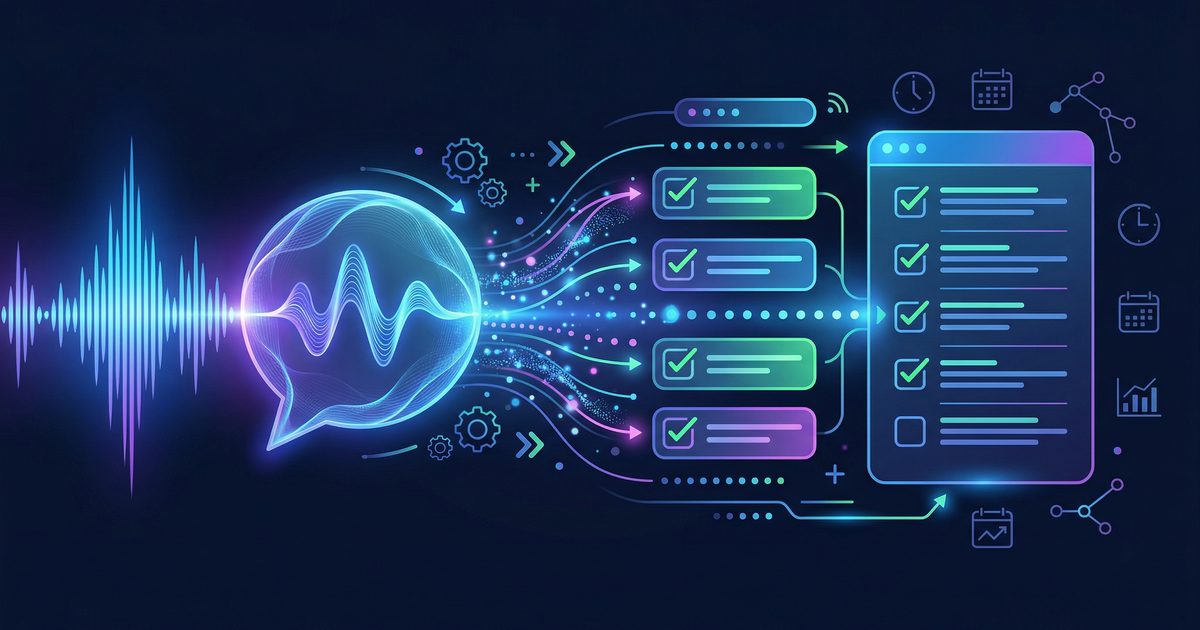
Never lose track of action items from meetings, brainstorming sessions, or random thoughts. This workflow:
- Receives voice messages (WhatsApp/Telegram)
- Transcribes audio to text using Whisper
- Extracts tasks, deadlines, and owners using AI
- Creates structured tasks in your task manager
Use Cases:
- Meeting notes → Action items
- Brainstorming ideas → Organized tasks
- Random thoughts → Captured and scheduled
- Voice memos → Structured todos
Architecture
[User sends voice message]
         ↓
[Download audio file]
         ↓
[Whisper transcription]
         ↓
[AI extracts action items]
  - Task description
  - Deadline (if mentioned)
  - Priority
  - Category/project
         ↓
[Create tasks in system]
  - Google Tasks
  - Todoist
  - Notion
  - Etc.
         ↓
[Confirm to user with summary]
Prerequisites
- OpenClaw installed
- Whisper (OpenAI) or local Whisper setup
- Task manager (Google Tasks, Todoist, or Notion)
- Telegram/WhatsApp bot integration
Step 1: Install Whisper
Option A: OpenAI API (Easiest)
# Set API key
export OPENAI_API_KEY="your-key-here"
Option B: Local Whisper (Privacy, No API costs)
# Install dependencies
pip install openai-whisper ffmpeg-python

# Download model (tiny/base/small/medium/large)
whisper --model tiny --help
Step 2: Create Transcription Script
scripts/voice-to-text.py:
#!/usr/bin/env python3
"""
Transcribe audio to text using Whisper
Usage: python3 voice-to-text.py <audio_file>
"""

import sys
import subprocess
import os

def transcribe_whisper_local(audio_path, model="base"):
    """Transcribe using local Whisper"""
    result = subprocess.run(
        ["whisper", audio_path, "--model", model, "--language", "id", "--output_format", "txt"],
        capture_output=True,
        text=True
    )

    # Read output file
    txt_path = audio_path.replace(os.path.splitext(audio_path)[1], ".txt")
    with open(txt_path, "r") as f:
        return f.read().strip()

def transcribe_whisper_api(audio_path):
    """Transcribe using OpenAI API"""
    import openai

    with open(audio_path, "rb") as audio_file:
        transcript = openai.audio.transcriptions.create(
            model="whisper-1",
            file=audio_file,
            language="id"  # or "en" for English
        )
    return transcript.text

def main():
    if len(sys.argv) < 2:
        print("Usage: python3 voice-to-text.py <audio_file>")
        sys.exit(1)

    audio_path = sys.argv[1]

    print("🎙️ Transcribing...")

    # Choose method
    if os.getenv("OPENAI_API_KEY"):
        text = transcribe_whisper_api(audio_path)
    else:
        text = transcribe_whisper_local(audio_path)

    print("✅ Transcription:")
    print(text)

    # Save to file
    output_path = audio_path + ".transcript.txt"
    with open(output_path, "w") as f:
        f.write(text)

    print(f"\n📝 Saved to: {output_path}")

if __name__ == "__main__":
    main()
Step 3: Extract Action Items
scripts/extract-actions.py:
#!/usr/bin/env python3
"""
Extract action items from transcript using AI
Usage: python3 extract-actions.py <transcript_file>
"""

import sys
import json
import re
from datetime import datetime, timedelta

def extract_with_ai(transcript):
    """Use OpenClaw/AI to extract structured tasks"""

    prompt = f"""Analyze this transcript and extract action items.

Transcript:
"""{transcript}"""

Extract in this JSON format:
{{
  "summary": "Brief summary of the discussion",
  "tasks": [
    {{
      "task": "Clear task description",
      "deadline": "YYYY-MM-DD or null",
      "priority": "high/medium/low",
      "category": "work/personal/urgent",
      "context": "Any relevant context"
    }}
  ]
}}

Guidelines:
- Convert vague statements to clear action items
- Infer deadlines from phrases like "besok", "minggu depan", "hari Jumat"
- Set priority based on urgency words
- Include context for clarity"""

    # Call your AI (OpenClaw, OpenAI, etc.)
    response = call_ai_model(prompt)
    return json.loads(response)

def parse_relative_dates(text):
    """Convert relative dates to absolute"""
    today = datetime.now()

    mappings = {
        r"besok|tomorrow": today + timedelta(days=1),
        r"lusa": today + timedelta(days=2),
        r"minggu depan|next week": today + timedelta(weeks=1),
        r"bulan depan|next month": today + timedelta(days=30),
        r"hari ini|today": today,
    }

    for pattern, date in mappings.items():
        if re.search(pattern, text, re.IGNORECASE):
            return date.strftime("%Y-%m-%d")

    return None

def main():
    if len(sys.argv) < 2:
        print("Usage: python3 extract-actions.py <transcript_file>")
        sys.exit(1)

    transcript_path = sys.argv[1]

    with open(transcript_path, "r") as f:
        transcript = f.read()

    print("🤖 Extracting action items...")
    result = extract_with_ai(transcript)

    print(f"\n📋 Summary: {result['summary']}")
    print(f"\n✅ Found {len(result['tasks'])} tasks:\n")

    for i, task in enumerate(result['tasks'], 1):
        print(f"{i}. {task['task']}")
        if task['deadline']:
            print(f"   📅 Deadline: {task['deadline']}")
        print(f"   🏷️ Priority: {task['priority']}")
        print(f"   📂 Category: {task['category']}")
        print()

    # Save structured data
    output_path = transcript_path.replace(".txt", ".tasks.json")
    with open(output_path, "w") as f:
        json.dump(result, f, indent=2)

    print(f"💾 Saved to: {output_path}")

if __name__ == "__main__":
    main()
Step 4: Create Tasks in Google Tasks
scripts/create-tasks.py:
#!/usr/bin/env python3
"""
Create tasks in Google Tasks from JSON
Usage: python3 create-tasks.py <tasks_json_file>
"""

import sys
import json
import subprocess

def create_google_task(task):
    """Create task using gog CLI"""

    # Build command
    cmd = ["gog", "tasks", "create", task['task']]

    # Add notes with context
    notes = f"From voice memo\nPriority: {task['priority']}\nContext: {task.get('context', 'N/A')}"
    cmd.extend(["--notes", notes])

    # Add due date if available
    if task.get('deadline'):
        cmd.extend(["--due", task['deadline']])

    result = subprocess.run(cmd, capture_output=True, text=True)
    return result.returncode == 0

def main():
    if len(sys.argv) < 2:
        print("Usage: python3 create-tasks.py <tasks_json_file>")
        sys.exit(1)

    with open(sys.argv[1], "r") as f:
        data = json.load(f)

    print(f"📝 Creating {len(data['tasks'])} tasks...\n")

    created = 0
    for task in data['tasks']:
        if create_google_task(task):
            print(f"✅ Created: {task['task'][:50]}...")
            created += 1
        else:
            print(f"❌ Failed: {task['task'][:50]}...")

    print(f"\n📊 Summary: {created}/{len(data['tasks'])} tasks created")

if __name__ == "__main__":
    main()
Step 5: Full Pipeline Script
scripts/voice-to-action.sh:
#!/bin/bash
# Voice memo → Action items pipeline
# Usage: ./voice-to-action.sh <audio_file>

AUDIO_FILE="$1"

if [ -z "$AUDIO_FILE" ]; then
    echo "Usage: ./voice-to-action.sh <audio_file>"
    exit 1
fi

echo "🎙️ Processing voice memo..."
echo "=========================="

# Step 1: Transcribe
echo "📝 Step 1: Transcribing audio..."
python3 scripts/voice-to-text.py "$AUDIO_FILE"
TRANSCRIPT="${AUDIO_FILE}.transcript.txt"

if [ ! -f "$TRANSCRIPT" ]; then
    echo "❌ Transcription failed"
    exit 1
fi

# Step 2: Extract action items
echo ""
echo "🤖 Step 2: Extracting action items..."
python3 scripts/extract-actions.py "$TRANSCRIPT"
TASKS_FILE="${TRANSCRIPT}.tasks.json"

if [ ! -f "$TASKS_FILE" ]; then
    echo "❌ Action extraction failed"
    exit 1
fi

# Step 3: Create tasks
echo ""
echo "📋 Step 3: Creating tasks..."
python3 scripts/create-tasks.py "$TASKS_FILE"

echo ""
echo "✅ Done! Check your task manager."
Make it executable:
chmod +x scripts/voice-to-action.sh
Step 6: Telegram Integration
# In your Telegram bot handler
import subprocess
import os

async def handle_voice(message):
    """Process voice messages"""

    # Download voice file
    voice_file = await message.voice.get_file()
    audio_path = f"/tmp/voice_{message.message_id}.ogg"
    await voice_file.download(audio_path)

    # Process
    await message.reply("🎙️ Processing your voice memo...")

    result = subprocess.run(
        ["bash", "scripts/voice-to-action.sh", audio_path],
        capture_output=True,
        text=True
    )

    # Parse results
    if result.returncode == 0:
        # Extract task count from output
        summary = parse_summary(result.stdout)
        await message.reply(
            f"✅ Voice memo processed!\n\n"
            f"📋 {summary['task_count']} tasks created\n"
            f"📅 {summary['with_deadline']} with deadlines\n"
            f"🔥 {summary['high_priority']} high priority\n\n"
            f"Check your Google Tasks!"
        )
    else:
        await message.reply("❌ Failed to process. Please try again.")

    # Cleanup
    os.remove(audio_path)
Example Output
Input: 45-second voice memo
Output:
🎙️ Processing voice memo...
==========================
📝 Step 1: Transcribing audio...
✅ Transcription:
"Jadi besok kita harus kirim proposal ke client ABC, dan juga jangan
lupa review design yang dikirim tim kemarin. Minggu depan ada meeting
penting sama stakeholder, prepare presentasi ya."

🤖 Step 2: Extracting action items...
📋 Summary: Meeting follow-ups and deadlines

✅ Found 3 tasks:

1. Kirim proposal ke client ABC
   📅 Deadline: 2026-03-09
   🏷️ Priority: high
   📂 Category: work

2. Review design dari tim
   📅 Deadline: 2026-03-09
   🏷️ Priority: medium
   📂 Category: work

3. Prepare presentasi untuk stakeholder meeting
   📅 Deadline: 2026-03-16
   🏷️ Priority: high
   📂 Category: work

📝 Creating 3 tasks...
✅ Created: Kirim proposal ke client ABC...
✅ Created: Review design dari tim...
✅ Created: Prepare presentasi untuk stakeholder...

📊 Summary: 3/3 tasks created
✅ Done! Check your task manager.
Advanced Features
Multiple Languages
def detect_language(text):
    """Detect language and set Whisper language"""
    # Simple heuristic
    indonesian_words = ["yang", "dan", "dengan", "untuk", "dari"]
    english_words = ["the", "and", "with", "for", "from"]

    words = text.lower().split()
    id_score = sum(1 for w in words if w in indonesian_words)
    en_score = sum(1 for w in words if w in english_words)

    return "id" if id_score > en_score else "en"
Smart Reminders
def schedule_reminder(task, minutes_before=30):
    """Schedule reminder before deadline"""
    # Use cron or system scheduler
    pass
Context Preservation
def link_to_original(task_id, audio_path):
    """Keep reference to original voice memo"""
    # Upload audio to Drive, link in task notes
    pass
Alternative Integrations
Todoist
import todoist_api_python

def create_todoist_task(task):
    api = todoist_api_python.TodoistAPI("your-token")
    api.add_task(
        content=task['task'],
        due_date=task.get('deadline'),
        priority=4 if task['priority'] == 'high' else 1
    )
Notion
from notion_client import Client

def create_notion_task(task):
    notion = Client(auth="your-token")
    notion.pages.create(
        parent={"database_id": "your-db-id"},
        properties={
            "Name": {"title": [{"text": {"content": task['task']}}]},
            "Status": {"select": {"name": "To Do"}},
            "Due": {"date": {"start": task.get('deadline')}} if task.get('deadline') else None
        }
    )
Troubleshooting
Poor audio quality
# Pre-process audio
ffmpeg -i input.ogg -ar 16000 -ac 1 -c:a libopus output.ogg
Wrong language detection
- Force language:
--language idor--language en
Missed deadlines
- Improve date parsing with more patterns
- Ask AI to clarify ambiguous dates
Conclusion
You now have a voice-to-action pipeline that:
- ✅ Transcribes voice memos automatically
- ✅ Extracts structured tasks with AI
- ✅ Creates tasks in your preferred system
- ✅ Works with Telegram/WhatsApp
Next Steps:
- Add speaker diarization (who said what)
- Generate meeting summaries
- Integrate with calendar for time-blocked tasks
Tutorial created for OpenClaw Sumopod
← Artikel Sebelumnya
OpenClaw + Alibaba Cloud: 8 AI Model, 1 API Key — Hemat 90%
Artikel Selanjutnya →
Visual Data Alert — Dari Data jadi Grafik Otomatis
Baca Juga



Ada Pertanyaan? Yuk Ngobrol!
Butuh bantuan setup OpenClaw, konsultasi IT, atau mau diskusi project engineering? Book a call langsung — gratis.
Book a Call — Gratisvia Cal.com • WITA (UTC+8)
Newsletter
Subscribe to Newsletter
Artikel baru, automation notes, dan engineering insight. Clean inbox, no spam.
Dengan subscribe, kamu setuju menerima update seperlunya.