
Build Service Health Dashboard — Monitor Semua Service di Satu Tempat
📎 Source:service-health-dashboard.md — view on GitHub & star ⭐
🏥 Service Health Dashboard with Auto-Retry
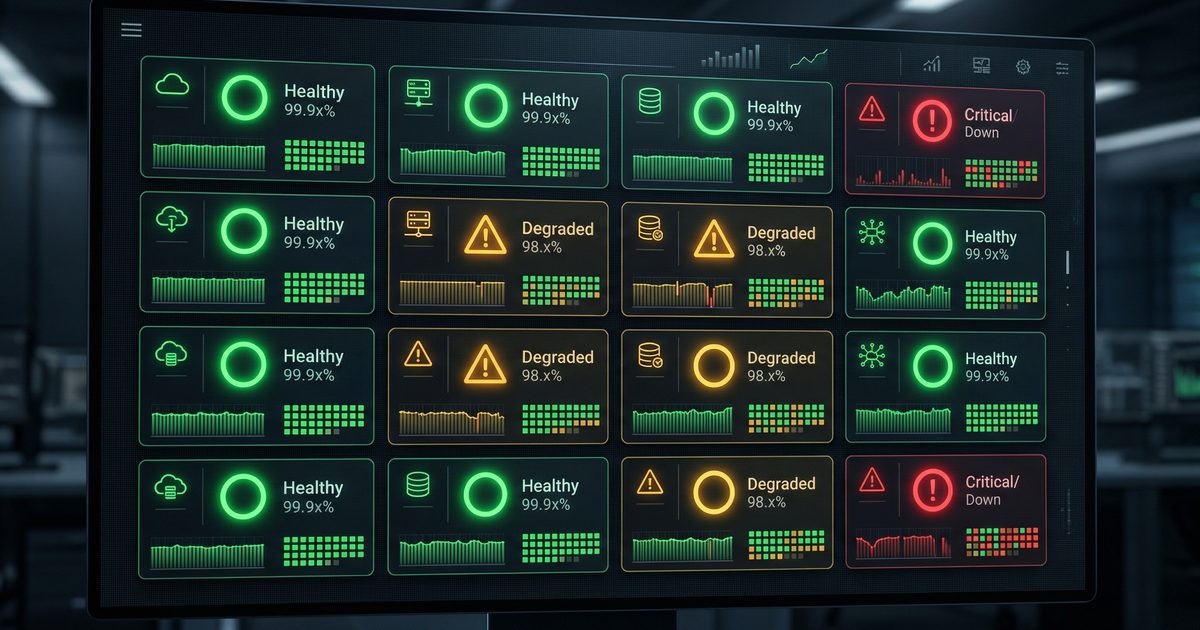
Monitor your services 24/7 with beautiful status dashboards, automatic retries, and instant Telegram alerts! 🚨
🎯 What You'll Build
┌─────────────────────────────────────────────────────────────┐
│              HEALTH DASHBOARD OVERVIEW                        │
├─────────────────────────────────────────────────────────────┤
│                                                             │
│  📊 SERVICE STATUS DASHBOARD                                │
│  ═══════════════════════════════                            │
│                                                             │
│  🟢 API Gateway        UP     45ms    ✅ Healthy            │
│  🟢 Database           UP     23ms    ✅ Healthy            │
│  🟡 Cache Service      UP     120ms   ⚠️  Degraded          │
│  🔴 Payment API        DOWN   --      🚨 CRITICAL           │
│  🟢 Website            UP     89ms    ✅ Healthy            │
│                                                             │
│  Last check: 14:32:05  |  Next: 14:32:35                     │
│                                                             │
└─────────────────────────────────────────────────────────────┘
🎯 Before vs After
🔄 Health Check Flow

Every Minute --> B📋 Load Service List
style A fill:#e1f5fe,stroke:#01579b,stroke-width:2px
style B fill:#fff8e1,stroke:#f57f17,stroke-width:2px
B --> C{🔍 Check<br/>Service Health}
style C fill:#fff3e0,stroke:#e65100,stroke-width:2px

C -->|Attempt 1| D{Response<br/>OK?}
D -->|NO| E[⏳ Wait 2s]
D -->|YES| H[🟢 Status: UP]
style D fill:#fce4ec,stroke:#c2185b,stroke-width:2px
style H fill:#c8e6c9,stroke:#2e7d32,stroke-width:2px

E -->|Attempt 2| F{Response<br/>OK?}
F -->|NO| G[⏳ Wait 2s]
F -->|YES| H

G -->|Attempt 3| I{Response<br/>OK?}
I -->|NO| J[🔴 Status: DOWN]
I -->|YES| H
style J fill:#ffcdd2,stroke:#c62828,stroke-width:2px

H --> K[💾 Save Result]
J --> L{Alert<br/>Cooldown?}
style K fill:#e1bee7,stroke:#6a1b9a,stroke-width:2px
style L fill:#f3e5f5,stroke:#7b1fa2,stroke-width:2px

L -->|>5 min| M[🚨 Send Telegram Alert]
L -->|<5 min| N[📝 Log Only]
style M fill:#ffccbc,stroke:#d84315,stroke-width:2px
style N fill:#cfd8dc,stroke:#455a64,stroke-width:2px'}
📡 Alert Sequence Flow
Cron->>Script: Trigger check

loop Each Service
    Script->>Script: Check cache first

    alt Cache stale/missing
        Script->>participant_svc: HTTP GET /health
        participant_svc-->>Script: Response + Timing

        Script->>Script: Calculate status
        Script->>Log: Save result JSON
    end

    alt Status DOWN
        Script->>Script: Check last alert time

        alt Alert cooldown passed
            Script->>TG: Send alert message
            TG-->>Script: Message sent ✅
        end
    else Status UP (recovered)
        Script->>TG: Send recovery notice ✅
    end
end

Script->>Script: Print dashboard'}
🏗️ Architecture
┌─────────────────────────────────────────────────────────────┐
│              HEALTH MONITORING ARCHITECTURE                 │
├─────────────────────────────────────────────────────────────┤
│                                                             │
│   ┌─────────────────┐                                       │
│   │   CRON (1 min)  │────┐                                  │
│   └─────────────────┘    │                                  │
│                          ▼                                  │
│   ┌──────────────────────────────────────┐                 │
│   │     HEALTH CHECK SCRIPT              │                 │
│   ├──────────────────────────────────────┤                 │
│   │  For each service:                   │                 │
│   │    1. Check cache (recent result?)   │                 │
│   │    2. If stale → HTTP request        │                 │
│   │    3. Measure response time          │                 │
│   │    4. Determine status               │                 │
│   │    5. Auto-retry if failed           │                 │
│   └──────────┬───────────────────────────┘                 │
│              │                                              │
│              ▼                                              │
│   ┌──────────────────────────────────────┐                 │
│   │         DECISION ENGINE              │                 │
│   │  Status: OK → Continue monitoring    │                 │
│   │  Status: DEGRADED → Log warning      │                 │
│   │  Status: DOWN → 🚨 ALERT!            │                 │
│   └──────────┬───────────────────────────┘                 │
│              │                                              │
│              ▼                                              │
│   ┌──────────────────────────────────────┐                 │
│   │         ALERT CHANNELS               │                 │
│   │  • Telegram instant message          │                 │
│   │  • JSON log for dashboards           │                 │
│   │  • Redis for quick status            │                 │
│   └──────────────────────────────────────┘                 │
│                                                             │
└─────────────────────────────────────────────────────────────┘
🛠️ Installation
Prerequisites
# Required tools
sudo apt-get install curl jq bc

# Optional: Redis for caching
sudo apt-get install redis-server
📋 Step 1: Create Health Check Script
Save this as ~/scripts/health-dashboard.sh:
#!/bin/bash

# =============================================================================
# 🏥 Service Health Dashboard with Auto-Retry
# =============================================================================

set -euo pipefail

# 🎨 Colors
RED='\033[0;31m'
GREEN='\033[0;32m'
YELLOW='\033[1;33m'
BLUE='\033[0;34m'
CYAN='\033[0;36m'
NC='\033[0m'

# 📁 Configuration
CONFIG_FILE="${HOME}/.config/health-monitor/services.json"
LOG_DIR="${HOME}/.config/health-monitor/logs"
ALERT_COOLDOWN=300  # 5 minutes between alerts for same service
MAX_RETRIES=3
RETRY_DELAY=2

# 🔔 Telegram config (optional)
TELEGRAM_BOT_TOKEN="${TELEGRAM_BOT_TOKEN:-}"
TELEGRAM_CHAT_ID="${TELEGRAM_CHAT_ID:-}"

# Create directories
mkdir -p "$LOG_DIR"

# =============================================================================
# 🛠️ UTILITY FUNCTIONS
# =============================================================================

log() {
    echo -e "${BLUE}[$(date '+%H:%M:%S')]${NC} $1"
}

error() {
    echo -e "${RED}[ERROR]${NC} $1"
}

success() {
    echo -e "${GREEN}[OK]${NC} $1"
}

warning() {
    echo -e "${YELLOW}[WARN]${NC} $1"
}

# =============================================================================
# 🔍 HEALTH CHECK FUNCTIONS
# =============================================================================

check_http() {
    local url="$1"
    local timeout="${2:-5}"

    local start_time end_time duration
    start_time=$(date +%s%N)

    local http_code
    http_code=$(curl -s -o /dev/null -w "%{http_code}" --max-time "$timeout" "$url" 2>/dev/null || echo "000")

    end_time=$(date +%s%N)
    duration=$(( (end_time - start_time) / 1000000 ))

    # Determine status
    local status="DOWN"
    if [ "$http_code" = "200" ] || [ "$http_code" = "204" ]; then
        status="UP"
    elif [ "$http_code" = "000" ]; then
        status="DOWN"
    else
        status="DEGRADED"
    fi

    jq -n \
        --arg status "$status" \
        --arg http_code "$http_code" \
        --argjson response_time "$duration" \
        '{status: $status, http_code: $http_code, response_time: $response_time}'
}

check_tcp() {
    local host="$1"
    local port="$2"
    local timeout="${3:-3}"

    local start_time end_time duration
    start_time=$(date +%s%N)

    if timeout "$timeout" bash -c ">/dev/tcp/$host/$port" 2>/dev/null; then
        end_time=$(date +%s%N)
        duration=$(( (end_time - start_time) / 1000000 ))
        jq -n --argjson response_time "$duration" '{status: "UP", response_time: $response_time}'
    else
        jq -n '{status: "DOWN", response_time: -1}'
    fi
}

# =============================================================================
# 🔄 AUTO-RETRY LOGIC
# =============================================================================

check_with_retry() {
    local service_name="$1"
    local check_type="$2"
    local target="$3"
    local port="${4:-}"

    local attempt=1
    local result

    while [ $attempt -le $MAX_RETRIES ]; do
        log "Checking $service_name (attempt $attempt/$MAX_RETRIES)..."

        # Perform check
        case "$check_type" in
            http)
                result=$(check_http "$target")
                ;;
            tcp)
                result=$(check_tcp "$target" "$port")
                ;;
            *)
                error "Unknown check type: $check_type"
                return 1
                ;;
        esac

        local status
        status=$(echo "$result" | jq -r '.status')

        # If UP, return immediately
        if [ "$status" = "UP" ]; then
            echo "$result"
            return 0
        fi

        # If not last attempt, wait and retry
        if [ $attempt -lt $MAX_RETRIES ]; then
            warning "Check failed, retrying in ${RETRY_DELAY}s..."
            sleep $RETRY_DELAY
        fi

        ((attempt++))
    done

    # Return final result (DOWN or DEGRADED)
    echo "$result"
}

# =============================================================================
# 📊 STATUS DISPLAY
# =============================================================================

get_status_emoji() {
    case "$1" in
        UP) echo "🟢" ;;
        DOWN) echo "🔴" ;;
        DEGRADED) echo "🟡" ;;
        *) echo "⚪" ;;
    esac
}

get_health_indicator() {
    local status="$1"
    local response_time="$2"

    if [ "$status" = "DOWN" ]; then
        echo "🚨 CRITICAL"
    elif [ "$status" = "DEGRADED" ]; then
        echo "⚠️  WARNING"
    elif [ "$response_time" -gt 500 ]; then
        echo "🐢 SLOW"
    else
        echo "✅ HEALTHY"
    fi
}

print_dashboard() {
    local results="$1"

    echo ""
    echo -e "${CYAN}═══════════════════════════════════════════════════${NC}"
    echo -e "${CYAN}        📊 SERVICE HEALTH DASHBOARD                 ${NC}"
    echo -e "${CYAN}═══════════════════════════════════════════════════${NC}"
    printf "\n%-20s %-8s %-8s %-12s\n" "Service" "Status" "Time" "Health"
    echo "───────────────────────────────────────────────────"

    local total_services up_count down_count
    total_services=$(echo "$results" | jq 'length')
    up_count=$(echo "$results" | jq '[.[] | select(.status == "UP")] | length')
    down_count=$(echo "$results" | jq '[.[] | select(.status == "DOWN")] | length')

    echo "$results" | jq -r 'to_entries[] |
        "\(.key)|\(.value.status)|\(.value.response_time)|\(.value.http_code // "TCP")"' | \
    while IFS='|' read -r name status response_time http_code; do
        local emoji health
        emoji=$(get_status_emoji "$status")
        health=$(get_health_indicator "$status" "$response_time")

        if [ "$response_time" = "-1" ]; then
            printf "%-20s %s %-6s %-8s %s\n" "$name" "$emoji" "$status" "--" "$health"
        else
            printf "%-20s %s %-6s %-8s %s\n" "$name" "$emoji" "$status" "${response_time}ms" "$health"
        fi
    done

    echo "───────────────────────────────────────────────────"
    echo -e "Summary: ${GREEN}$up_count UP${NC}, ${RED}$down_count DOWN${NC}, $total_services total"
    echo -e "Checked: $(date '+%Y-%m-%d %H:%M:%S')"
    echo ""
}

# =============================================================================
# 🔔 ALERT FUNCTIONS
# =============================================================================

send_telegram_alert() {
    local service_name="$1"
    local status="$2"
    local details="$3"

    [ -z "$TELEGRAM_BOT_TOKEN" ] && return 0
    [ -z "$TELEGRAM_CHAT_ID" ] && return 0

    local emoji message
    case "$status" in
        DOWN)
            emoji="🚨"
            message="${emoji} <b>SERVICE DOWN</b>\n\n"
            ;;
        DEGRADED)
            emoji="⚠️"
            message="${emoji} <b>SERVICE DEGRADED</b>\n\n"
            ;;
        UP)
            emoji="✅"
            message="${emoji} <b>SERVICE RECOVERED</b>\n\n"
            ;;
    esac

    message+="<b>Service:</b> $service_name\n"
    message+="<b>Status:</b> $status\n"
    message+="<b>Time:</b> $(date '+%H:%M:%S')\n"
    message+="<b>Details:</b> $details"

    curl -s -X POST "https://api.telegram.org/bot${TELEGRAM_BOT_TOKEN}/sendMessage" \
        -d "chat_id=${TELEGRAM_CHAT_ID}" \
        -d "parse_mode=HTML" \
        -d "text=$message" >/dev/null 2>&1 || true
}

should_alert() {
    local service_name="$1"
    local status="$2"

    local alert_file="$LOG_DIR/.alert_${service_name}"
    local last_alert=0

    if [ -f "$alert_file" ]; then
        last_alert=$(cat "$alert_file")
    fi

    local now
    now=$(date +%s)
    local time_diff=$((now - last_alert))

    # Alert if: status is bad AND (no previous alert OR cooldown passed)
    if [ "$status" != "UP" ] && [ $time_diff -gt $ALERT_COOLDOWN ]; then
        echo "$now" > "$alert_file"
        return 0  # Should alert
    fi

    # Clear alert file if service recovered
    if [ "$status" = "UP" ] && [ -f "$alert_file" ]; then
        rm -f "$alert_file"
        return 0  # Should alert (recovery)
    fi

    return 1  # Should not alert
}

# =============================================================================
# 💾 LOGGING
# =============================================================================

save_results() {
    local results="$1"
    local log_file="$LOG_DIR/health-$(date +%Y%m%d).json"

    # Append to daily log
    local entry
    entry=$(jq -n \
        --arg timestamp "$(date -Iseconds)" \
        --argjson results "$results" \
        '{timestamp: $timestamp, services: $results}')

    echo "$entry" >> "$log_file"

    # Keep only last 7 days of logs
    find "$LOG_DIR" -name "health-*.json" -mtime +7 -delete 2>/dev/null || true
}

# =============================================================================
# 🚀 MAIN EXECUTION
# =============================================================================

main() {
    # Default services if no config
    local services
    services='{
        "API Gateway": {"type": "http", "url": "https://api.example.com/health"},
        "Website": {"type": "http", "url": "https://example.com"},
        "Database": {"type": "tcp", "host": "localhost", "port": 5432}
    }'

    # Load custom config if exists
    if [ -f "$CONFIG_FILE" ]; then
        services=$(cat "$CONFIG_FILE")
    fi

    log "🏥 Starting health check for $(echo "$services" | jq 'length') services..."

    local results="{}"

    # Check each service
    while IFS='|' read -r name config; do
        local check_type url host port
        check_type=$(echo "$config" | jq -r '.type')

        local result
        if [ "$check_type" = "http" ]; then
            url=$(echo "$config" | jq -r '.url')
            result=$(check_with_retry "$name" "http" "$url")
        else
            host=$(echo "$config" | jq -r '.host')
            port=$(echo "$config" | jq -r '.port')
            result=$(check_with_retry "$name" "tcp" "$host" "$port")
        fi

        # Add to results
        results=$(echo "$results" | jq --arg name "$name" --argjson res "$result" '. + {($name): $res}')

        # Check if should alert
        local status
        status=$(echo "$result" | jq -r '.status')

        if should_alert "$name" "$status"; then
            local details
            details=$(echo "$result" | jq -r '[to_entries[] | "\(.key): \(.value)"] | join(", ")')
            send_telegram_alert "$name" "$status" "$details"
        fi

    done <<< "$(echo "$services" | jq -r 'to_entries[] | "\(.key)|\(.value | @json)"')"

    # Display dashboard
    print_dashboard "$results"

    # Save to log
    save_results "$results"

    # Exit with error if any service is down
    local down_count
    down_count=$(echo "$results" | jq '[.[] | select(.status == "DOWN")] | length')

    if [ "$down_count" -gt 0 ]; then
        exit 1
    fi

    exit 0
}

# Run
main "$@"
📋 Step 2: Create Configuration
Save this as ~/.config/health-monitor/services.json:
{
  "API Gateway": {
    "type": "http",
    "url": "https://api.yourservice.com/health",
    "timeout": 5
  },
  "Website": {
    "type": "http",
    "url": "https://yourservice.com",
    "timeout": 5
  },
  "Database": {
    "type": "tcp",
    "host": "localhost",
    "port": 5432,
    "timeout": 3
  },
  "Redis": {
    "type": "tcp",
    "host": "localhost",
    "port": 6379,
    "timeout": 3
  },
  "Payment API": {
    "type": "http",
    "url": "https://payments.yourservice.com/status",
    "timeout": 10
  }
}
📋 Step 3: Telegram Setup
# Set environment variables
export TELEGRAM_BOT_TOKEN="your_bot_token_here"
export TELEGRAM_CHAT_ID="your_chat_id_here"

# Or add to ~/.bashrc for persistence
echo 'export TELEGRAM_BOT_TOKEN="your_token"' >> ~/.bashrc
echo 'export TELEGRAM_CHAT_ID="your_chat_id"' >> ~/.bashrc
📋 Step 4: Cron Setup
# Edit crontab
crontab -e

# Check every minute
* * * * * /home/user/scripts/health-dashboard.sh >> /tmp/health-check.log 2>&1

# Or check every 5 minutes with summary
*/5 * * * * /home/user/scripts/health-dashboard.sh 2>&1 | tail -20 >> /tmp/health-summary.log
🎨 Sample Output
═══════════════════════════════════════════════════
        📊 SERVICE HEALTH DASHBOARD
═══════════════════════════════════════════════════

Service              Status   Time     Health
───────────────────────────────────────────────────
API Gateway          🟢 UP    45ms     ✅ HEALTHY
Website              🟢 UP    89ms     ✅ HEALTHY
Database             🟢 UP    23ms     ✅ HEALTHY
Redis                🟢 UP    12ms     ✅ HEALTHY
Payment API          🔴 DOWN  --       🚨 CRITICAL
───────────────────────────────────────────────────
Summary: 4 UP, 1 DOWN, 5 total
Checked: 2024-03-11 14:32:05
✅ Verification
# Test script
~/scripts/health-dashboard.sh

# Check logs
cat ~/.config/health-monitor/logs/health-$(date +%Y%m%d).json

# Test Telegram alert
export TELEGRAM_BOT_TOKEN="your_token"
export TELEGRAM_CHAT_ID="your_chat_id"
# (Temporarily change a service URL to invalid to trigger alert)
📚 Related Tutorials
Questions? Join the OpenClaw Discord 🏥
← Artikel Sebelumnya
Smart Email Forward dengan PDF Attachment — Otomatis & Pintar
Artikel Selanjutnya →
Redis Caching Pattern: Akselerasi API 10x dengan Cache yang Benar
Baca Juga


Ada Pertanyaan? Yuk Ngobrol!
Butuh bantuan setup OpenClaw, konsultasi IT, atau mau diskusi project engineering? Book a call langsung — gratis.
Book a Call — Gratisvia Cal.com • WITA (UTC+8)
Newsletter
Subscribe to Newsletter
Artikel baru, automation notes, dan engineering insight. Clean inbox, no spam.
Dengan subscribe, kamu setuju menerima update seperlunya.