
EcoFit Life Extension: Upgrade Sepam S40 ke P5 Tanpa Ganti Kabel
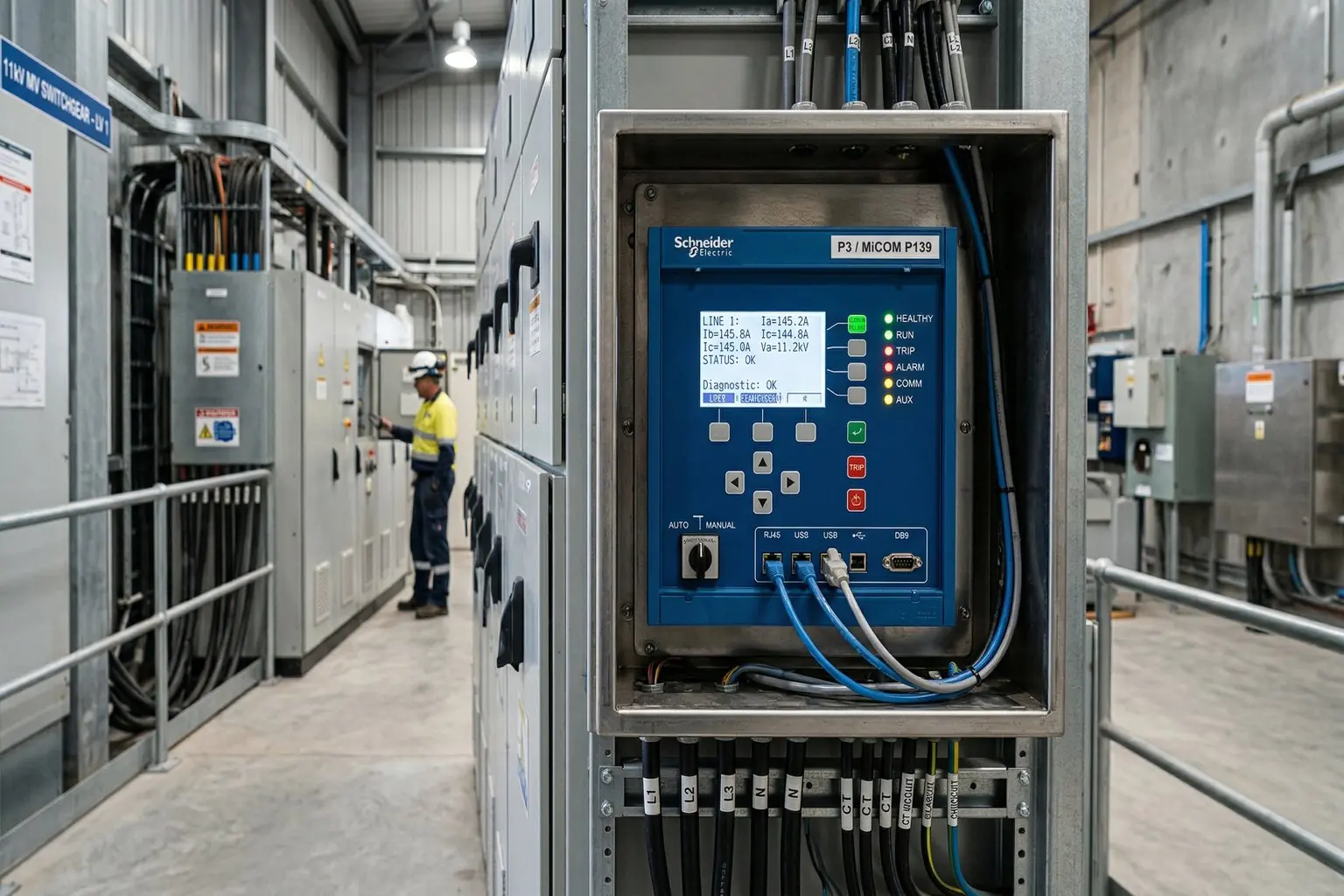
EcoFit Life Extension: Upgrade Sepam S40 ke P5 Tanpa Ganti Kabel
━━━━━━━━━━━━
Dulu kalo mau upgrade protection relay, persiapan-nya bisa makan waktu berminggu-minggu. Kabel harus di-reroute, panel harus dibongkar, sipil kerja... ribet. Shut down bisa sampe berhari-hari.
Schneider Electric kasih solusi: EcoFit™ Life Extension Advanced.
Decision Flow: Upgrade atau Replace?

━━━━━━━━━━━━
Problem: Sepam S40 Sudah Nggak Diproduksi
Sepam S40 (original brand Merlin Gerin) udah stop produksi sejak 2020. Spare parts makin susah, dan support resmi bakal berakhir 2028.
Kalo relay kamu had issues (baca: trouble), biaya maintenance naik tajam. Bahkan kalo ada emergency, lead time-nya nggak bisa diprediksi.
Options yang ada:
- Full replacement — mahal + downtime lama + sipil kerja
- Retrofit EcoFit — upgrade in-place, tanpa ganti kabel
Kebanyakan engineer pilih option 2.
━━━━━━━━━━━━
Solusi: EcoFit™ Life Extension Advanced with P5
EcoFit ini bukan pengganti biasa. Ini drop-in replacement yang didesain buat:
- Mount di socket lama Sepam S40
- Gunakan kabel existing
- Nggak perlu civil work
- Setting file bisa di-convert otomatis
Sepam S40          →    EcoFit P5
─────────────────────────────
2000               →    2023
Modbus Serial      →    Modbus Ethernet + IEC61850
11 LEDs            →    14 LEDs
No Cyber Security  →    Cyber Security Enabled
No Backup Memory   →    Backup Memory Built-in
No Mimic/SLD       →    Single Line Diagram Ready
━━━━━━━━━━━━
Key Technical Specifications

Compatibility:
- S40, S41, S42, S43, S44
- S50, S51, S52, S53, S54
- T40, T42, T50, T52
- M40, M41, G40
Mounting Options:
- Flush mounting
- Offset mounting (dengan mechanical adaptation socket)
Communication Protocols:
Power Supply:
- 24-250 VDC; 48V-240 VAC (S40)
- 24-48 VDC atau 48-250 VDC; 100-230 VAC (P5)
Cyber Security:
- ✅ Cyber security built-in
- ✅ 0-6 arc flash sensors
- ✅ Backup memory
━━━━━━━━━━━━
Setting Conversion: Automatic
Ini yang paling keren. Settings file Sepam (.S40, .S41, dll) bisa di-convert ke format P5 (.epz) pakai Setting Conversion Tool (SCT).
Software yang dipakai:
- SFT 2841 — untuk Sepam series
- Easergy Studio — untuk MiCOM P20
Conversion report generated otomatis, jadi engineer bisa verify semua parameter ke-migrate dengan benar.
━━━━━━━━━━━━
Benefits: Shut Down dari Hari ke Jam
DOWNTIME COMPARISON
──────────────────────────────────────
Full Replacement:   ████████████████ 3-5 days
EcoFit Upgrade:     ██ 4-8 hours
──────────────────────────────────────
Savings: ~80% downtime reduction
Concrete benefits:
- Lifetime extension — Existing switchboard dapat nyawa baru
- No cable change — Use existing wiring
- No civil work — Nggak perlu benerin infrastruktur
- Remote operation — Bisa monitor dari mana aja
- Connectivity — Smart sensors, energy management
- Sustainability — Recycling obsolete equipment, efficient use of resources
━━━━━━━━━━━━
Digital Capabilities Baru di P5
Ini yang membedakan P5 dari S40:
1. Single Line Diagram (Mimic)
S40: No P5: Yes — visual representation of your electrical system
2. Backup Memory
S40: No P5: Yes — settings saved even if power fails
3. Cyber Security
S40: No protection P5: Built-in — secure remote access, encrypted communication
4. Arc Flash Sensors
S40: No P5: 0-6 sensors — worker safety improved significantly
5. Programmable Function Keys
S40: No P5: 7 keys — custom shortcuts untuk operasi cepat
━━━━━━━━━━━━
Who Should Consider This?
Good candidates:
- Plant dengan Sepam S40 yang sudah aging
- Facility dimana shutdown = revenue loss
- Yang mau digitalization tapi nggak mau replace entire panel
- Mining, oil & gas, manufacturing dengan critical processes
Consider full replacement instead if:
- Panel sudah physically damaged
- Wiring sudah beyond repair
- Load requirements exceed P5 specs
━━━━━━━━━━━━
How to Get Started

Steps:
- Identify your Sepam model — cek type plate (S40, S41, dll)
- Export current settings — pakai SFT 2841 atau Easergy Pro
- Consult Schneider Electric — minta feasibility assessment
- Conversion tool test — convert settings ke .epz, verify report
- Schedule outage window — biasanya 4-8 jam cukup
- Installation & commissioning — Schneider certified engineer
📎 Datasheet: EcoFit Life Extension Advanced (Schneider Electric)
━━━━━━━━━━━━
Kesimpulan
EcoFit Life Extension Advanced ini solusi cerdas buat facility yang mau:
- Extend asset life tanpa capital expenditure besar
- Dapat fitur digital tanpa replace entire system
- Reduce downtime signifikan
- Improve safety dengan arc flash sensors
Kalo kamu punya Sepam S40 dan bingung mau apa next step — ini worth banget buat dievaluasi.
Questions? Contact Radian Group untuk technical consultation.
← Artikel Sebelumnya
Protection Relay Basics: Apa, Kenapa, dan Gimana Kerjanya
Artikel Selanjutnya →
Arc Flash Safety: Standar NFPA 70E dan PPE yang Wajib Dipahami
Baca Juga


Ada Pertanyaan? Yuk Ngobrol!
Butuh bantuan setup OpenClaw, konsultasi IT, atau mau diskusi project engineering? Book a call langsung — gratis.
Book a Call — Gratisvia Cal.com • WITA (UTC+8)
Newsletter
Subscribe to Newsletter
Artikel baru, automation notes, dan engineering insight. Clean inbox, no spam.
Dengan subscribe, kamu setuju menerima update seperlunya.
Zainul Fanani
Founder, Radian Group. Engineering & tech enthusiast.